

Boomerang Integrations in Workday: Your Undercover Superpower

Boomerang Integrations in Workday: Your Undercover Superpower
Let’s be honest: if you’re exporting a Workday report, doing a little Excel magic, then uploading it right back into Workday… you’re already doing a boomerang integration. You just haven’t automated it yet. Boomerang integrations are one of Workday’s most underutilized (and misunderstood) tools—quietly saving teams from spreadsheet chaos and double data entry. And at Syssero, we think it’s time they got the spotlight they deserve.
What Is a Boomerang Integration?
A boomerang integration is a fully internal Workday process—typically built using Workday Studio—that: - Extracts data from a custom report, business process, or other data source, - Applies business rules, transfromation, or validations, - Then writes it back into Workday using web services.
It’s fast, clean, and elegant. No middleware. No swivel-chair work. Just Workday doing what Workday does best—taking care of itself.
This kind of integration is ideal for tasks that start and end in Workday, but need a bit of transformation in between. Think of it like automating what’s currently living in someone’s head or hidden in a spreadsheet.
Boomerang vs. EIB: How to Choose
Not every integration needs to be fancy—and not everything should be a boomerang. Here’s a quick gut-check:
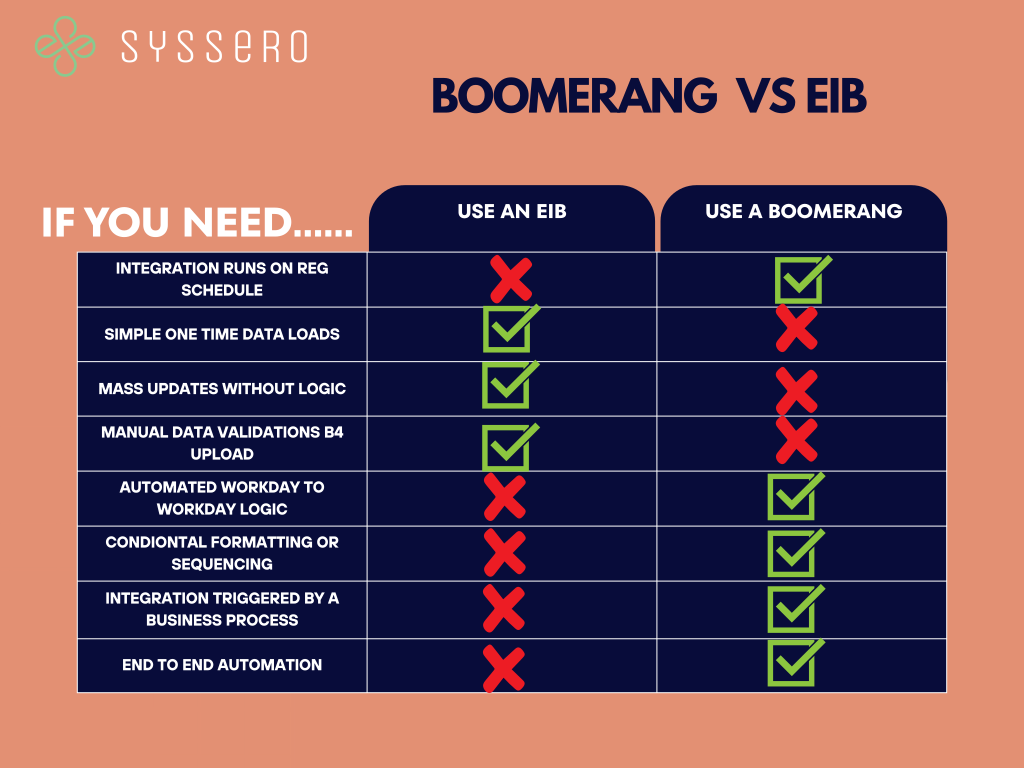
Still unsure? If the logic lives in a spreadsheet or is done the same way every time, and it starts and ends in Workday—boomerang is probably the way to go.
Real Use Cases (Yes, These Are Real)
- Auto-Generating Employee IDs Based on Company: A client needed employee IDs to follow a specific pattern. A boomerang integration triggered within the Hire BP could pull the new hire’s proposed company, apply sequence logic, and assign the appropriateEID.
- Custom Email Address Generation: For email formats based on location, company, or job function, boomerangs calculate the value and update Workday—automatically.
- Add PO Number from a Req to a Custom Object: When a requisition field needs to populate a custom object, a boomerang can do it cleanly and consistently.
- Update Username After Termination: When IT doesn’t update usernames, a boomerang triggered on termination can replace it with the user’s personal email, keeping things clean.
- Fix Customer Invoice Errors (Even by $0.01): Yes, even penny-level corrections. A Studio-based boomerang can target invoice lines and fix them without manual intervention.
Gotchas to Watch For
- Security setup is crucial—permissions for reports, launching, and web services are a must. - Data sources/Filtering must be airtight—bad inputs = bad outputs. - Check your logs—Integration Events will tell you what went wrong (or right).
Why Aren’t More Teams Using Them?
Because many don’t know this level of automation is even possible. If you’re exporting, modifying, and re-uploading data regularly, a boomerang could save you hours a week. They’re for more than just developers. They’re for: - Payroll teams - HRBPs - Finance managers - Anyone stuck in Workday déjà vu
The Bottom Line
Boomerang integrations automate the tedious Workday-to-Workday workflows we all secretly hate. They’re lightweight, powerful, and 100% native. If you’ve got a business rule and data to move—don’t reach for Excel. Reach for the boomerang.
Need help building one? At Syssero, we don’t just know Workday—we work Workday. Let’s turn your repetitive task into a smooth, automated loop.
Talk to our integration team here.

.svg)




.png)
A Real Conversation,
Not a Pricing Sheet


