

When to Use or Ditch Custom Objects in Workday

When to Use or Ditch Custom Objects in Workday
Custom Objects in Workday Are Powerful When Used Intentionally
Custom objects are one of Workday’s most flexible tools. They let you capture unique data that does not exist in the standard configuration. They are essential when you need something secure, reportable, and tied directly to a business object like Worker or Position.
While custom objects can be powerful, they require thoughtful governance over time. Within a proactive Workday Application Management Services (AMS) model, custom object usage is regularly reviewed to prevent unnecessary complexity, reporting issues, and long-term maintenance risk.
But with that power comes a responsibility to use them wisely. Once created, a custom object becomes a permanent part of your tenant. That is not a drawback—it is a reason to plan thoughtfully.
This guide walks you through when to use a custom object, when other options are a better fit, and how to make decisions that keep your configuration clean and scalable. And if you are unsure about your current setup, the Workday consulting team at Syssero is ready to help.
What Is A Custom Object?
A custom object is a user-defined extension of a delivered Workday object. If you need to track something like Risk Level for Positions or Contract Type for Organizations, a custom object allows you to store that data in a secure and reportable way.
You can configure them as single instance or multi instance. That means you can tie one custom record to each Worker or allow multiple entries like certifications, devices, or projects. Because they are tied to delivered business objects, they persist through job changes, org shifts, and other updates.
When a Custom Object Is the Right Call
These situations are a strong signal that a custom object is the right choice:
- The data does not exist anywhere else in Workday
- You need it to appear in reports, BIRT layouts, or integrations
- You want to secure the data with its own Workday security domain
- The information should persist through worker or position changes
- You need a one to many structure, such as multiple licenses or assets per person.
Custom objects bring flexibility and structure to your configuration. When used in the right context, they make your reporting and integration work much easier.
When You May Want to Use Another Approach
There are plenty of great Workday features that may meet your need without introducing long term elements. Here are a few times to consider alternatives:
- You only need the data in one specific business process like Hire
- A calculated field can produce the result based on existing data
- The value is used only for condition rules or display logic
- The request is temporary or may evolve within a few months
- A delivered prompt or field already provides a workable solution
Workday is filled with options, and choosing the simplest effective tool keeps your tenant lean and easy to manage. Many teams reach for a custom object when a configuration field would be easier to maintain.
Things to Know Before You Create One
A custom object is not something you can trial and remove later. It is a permanent addition to your tenant, which makes a strong case for planning and governance. Here are the key facts to understand:
- They cannot be deleted
You can inactivate a custom object, but it will always exist in your configuration. - They cannot be migrated
Custom objects must be rebuilt manually in each environment. Tools like Object Transporter and spreadsheet loads do not support them. - They require setup beyond creation
You will need to configure report access, permissions, and possibly EIB settings. Skipping these steps can lead to confusion down the road. - They are not automatically visible
You must manually add custom objects to any reports, dashboards, or business process pages where they are needed. - They add complexity to integrations
Target systems must be aware of the custom object structure, and updates must be coordinated to avoid breaks. - They can affect performance in high volume cases
If tied to heavily used objects like Worker, a multi-instance custom object can influence system performance in large tenants. - They must be documented
Auditors may ask about any custom object used for worker data, pay, or compliance purposes.
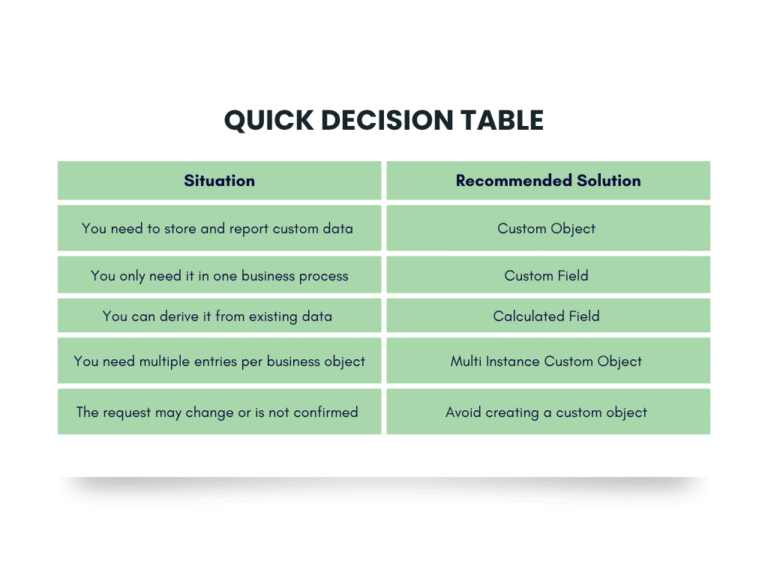
Simplified View to Help Decide What to Use:
Best Practices for Building Smarter
If a custom object is the right path forward, keep things clean and future friendly with these best practices:
- Use a naming prefix like SYS or CUST to signal it is custom
- Record who requested it and why
- Plan when it should be created, updated, or reviewed
- Limit creation rights to experienced admins
- Reevaluate annually to confirm continued value
- Secure and document the object from day one
These small habits will save you time and confusion later on.
Custom Object Governance in a Workday AMS Model
In a mature Workday AMS framework, custom objects aren’t “set and forget.” They’re evaluated periodically for relevance, reporting impact, security alignment, and performance implications. As organizations grow, what once solved a short-term need may introduce long-term complexity. Proactive governance ensures your tenant remains scalable and intentional.
The Bottom Line on Custom Objects
Custom objects in Workday offer a powerful way to capture and report on your organization’s unique data needs. They allow your configuration to be more aligned with your business structure, but they come with responsibilities. Since they are permanent, non migratable, and require ongoing support, the decision to create one should always be thoughtful.
Used strategically, custom objects become reliable tools for your team. Used casually, they can add unnecessary complexity. The key is to build only when it is truly needed and manage every custom object like a long term investment in your tenant’s success.
Need A Fresh Perspective
If you are unsure about how to manage existing custom objects or deciding whether to build a new one, let us help. Our Workday consulting team provides configuration audits that help you simplify, clarify, and scale smarter.

Contact Syssero for a Workday audit. We will help you evaluate your tenant and build with confidence.
Frequently Asked Questions
Can custom objects be deleted in Workday?
No. They can be inactivated but will remain in the system permanently.
Can I move custom objects to other tenants?
No. You must rebuild them manually in each tenant.
Are they automatically included in reports or processes ?
No. You must manually add them to any reports, dashboards, or processes.
Do they affect performance ?
They can in some cases, especially if used with large data volumes on high traffic objects.
Related Posts
.svg)




.png)
A Real Conversation,
Not a Pricing Sheet


